Automate your stream.
No code required.

No-code tools for overlays, alerts, hardware, and more — all reacting to your stream in real time.

Integrated Stream Overlays

Built-in canvas editor for drag-and-drop overlays — text, video, chat, goal bars, and custom HTML/CSS/JS widgets.

  • 6 default widget types: Text, Image, Video, Browser, Chat, Goal Bar
  • Custom Widgets with HTML/CSS/JS and live variable mappings
  • Persistent leaderboard data that survives restarts
  • Visual drag-and-drop canvas editor
  • Multiple overlays with independent widget layouts
Explore Overlays →

Global Variables

Persistent variables that survive restarts. Use as dynamic placeholders in overlays, messages, and actions.

  • Boolean, Number, and Text types
  • Persist across restarts
  • Dynamic placeholder system
Learn More →

Goals System

Track community targets with expiration dates, a dedicated Goal Bar widget, and progress-based actions.

  • Pause or expire goals on schedule
  • Dedicated Goal Bar stream widget
  • Goal progress actions
See Goal Bar Widget →

OBS Studio Integration

WebSocket control over OBS — switch scenes, toggle sources, and react to studio events in any workflow.

  • WebSocket-based connection
  • OBS events as triggers
  • OBS actions for scenes & sources
OBS Integration →

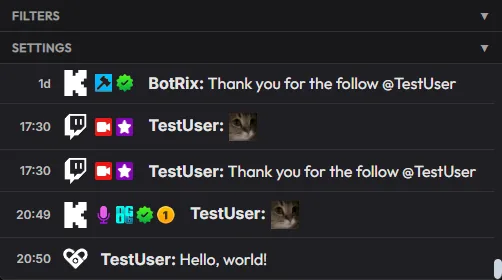
Combined Chat

One feed for all platform chats. Full 7TV, FFZ, and BTTV emote support with role highlighting and popout mode.

  • 7TV, FFZ, & BTTV emote rendering
  • Platform-specific badge icons per message
  • Custom role highlighting (mod, VIP, sub)
  • Popout window + OBS overlay widget
Combined Chat Details →

Alerts & Automation

Chain audio, OBS, HTTP, Discord, and hardware actions on any stream event — organised into Alert Sets.

  • 13 action types including HTTP, OSC, Discord, and file write
  • Alert Sets, folder-based organisation with drag-and-drop
  • Per-alert rate limiting and cooldown controls
  • Dynamic placeholders in every text field
Explore Alerts →

Hardware Control

PiShock & OpenShock triggered from donations and channel points — with dynamic intensity scaling from event amount.

  • PiShock & OpenShock native integration
  • Dynamic intensity from donation amount
  • Configurable safety caps (intensity & duration)
  • Per-alert rate limiting for hardware actions
Hardware Control Details →

VRChat Integration

Bridge stream events and VRChat over OSC — avatar parameters, chatbox messages, and VRChat as a trigger source.

  • Avatar bool/int/float parameter control
  • OSCQuery mDNS auto-discovery, no IP setup
  • In-game chatbox messaging from events
  • VRChat as an event trigger source
VRChat Integration →

VTuber Tools

Everything a VTuber needs in one place — avatar reactions, overlays, multi-platform chat, alerts, TTS, and hardware.

  • VRChat avatar reactions to stream events
  • 7TV/FFZ/BTTV combined chat support
  • TTS & sound effects on donations/subs
  • PiShock & OpenShock with safety caps
VTuber Tools →

And So Much More

Trigger Sound

Play audio on any stream event.

Tipping Menu & Queue

Donation-gated queue with leaderboard overlay and top tipper tracking.

Alert Sets

Folder-based alert groups. Toggle entire sets on or off instantly.

Spotify Integration

Now‑playing in overlays and as a dynamic placeholder anywhere.

Dynamic Placeholders

Insert event and global variables into any text field with one click.

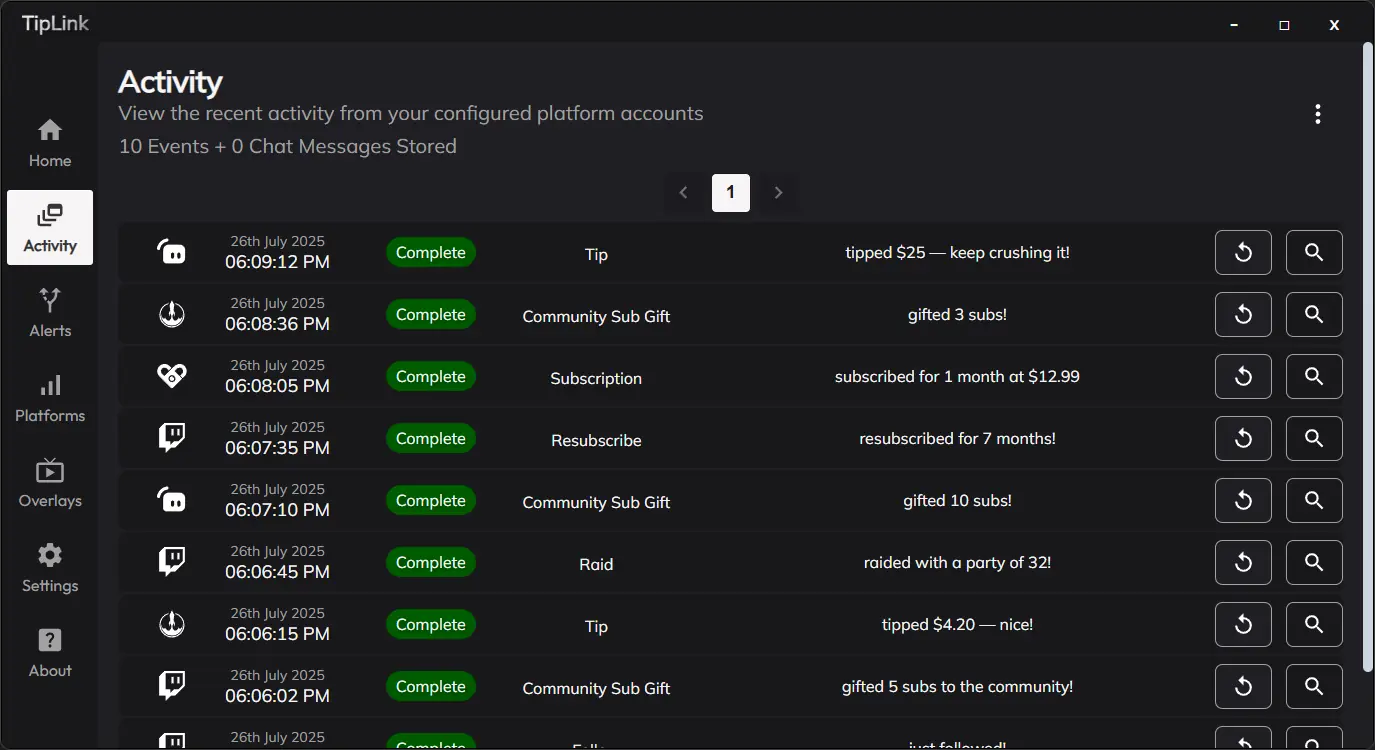
Activity Feed

Filterable event log with compact mode and popout window.

TikTok Live & YouTube Live

Beta support: chat, donations, and automation on both platforms.

Secure & Local

Credentials encrypted on your machine. No third-party servers.

Low Latency

Millisecond response times, built for live.

Ready to automate your stream?

Free 7-day trial. No card required.

Start Free Trial

Trusted by hundreds of creators for over 3 years

Looking for a reason to start using TipLink? Read our success stories

Pricing

Experience the full power of TipLink risk-free¹ for 7 days!

Start My 7-Day Free Trial

Patreon LogoPatreon

$7.99 / month*

Flexible monthly subscription

  • Access to all future updates ²
  • Cancel anytime
  • Discord Support
  • License for one device

Full License

$95*

One-time payment

  • Lifetime Access
  • Instant Activation
  • Discord Support
  • License for one device

* Prices are tax-exclusive. Final price calculated at checkout. Advertised pricing provided as a guideline only.
Advertised full license pricing converted from 70.00 GBP accurate at time of publication.

Is the Full License Worth It?

See how much value TipLink could offer with just one month of streaming

$25
3
Pays for itself in 4 streams
Total Monthly Tips
$300
Full License Cost
-$95
Potential Earnings*
$205+

* Figures are estimates for illustrative purposes only. Actual earnings may vary. Do not base purchase decisions solely on this calculator.

7-Day Free Trial Offer Terms

¹ Trials of TipLink are available for new users only via Patreon. After the trial period, your monthly paid subscription will continue unless cancelled in line with Patreon's terms. Trial abuse may result in account suspension or termination. If you have previously used TipLink via Patreon, you are not eligible for a trial.

² You will receive updates for the duration of your active subscription. If you cancel your subscription or payment cannot be collected, all benefits are void at the end of your billing period.